Note
Go to the end to download the full example code.
Cooling RaF#
Calculating Sisyphus 1D cooling forces for 226RaF.
from MoleCool import System, np, plt, pi, c, open_object, tools
import os.path
Force calculation#
if __name__ == '__main__':
    if not os.path.isfile("cooling_forces_RaF.pkl"):
Initialize levels#
        system = System(load_constants  = '226RaF',
                        description     = 'cooling_forces_RaF')

        # set up electronic states
        system.levels.add_electronicstate('X','gs')
        system.levels.X.load_states(v=[0])
        system.levels.add_electronicstate('A','exs')
        system.levels.A.load_states(v=[0])
Velocity and magnetic field#
        system.set_v0(
            [*np.arange(-12, -1, 0.25), *np.arange(-1, 0, 0.04)],
            direction = 'z',
            )

        system.Bfield.turnon(
            strength    = np.array([1., 4.])*1e-4,
            angle       = 45,
            direction   = np.array([0.,0.,1.]),
            )
Laser system#
        for k in [[0.,0.,1.],[0.,0.,-1.]]:
            system.lasers.add_sidebands(
                lamb        = system.levels.wavelengths.loc[('X',0),('A',0)]*1e-9,
                I           = np.array([2., 10.])*1e3/2,
                pol         = 'lin',
                k           = k,
                mod_freq    = 1e6,
                ratios      = None,
                sidebands   = -1*system.levels.X.freq.to_numpy(),
                offset_freq =  +2 * 3.183e6,
                )
OBEs evaluation#
        system.steadystate.update(dict(
            t_ini       = 50e-6,
            period      = 'standingwave',
            maxiters    = 8,
            condition   = [0.05,1]
            ))

        system.multiprocessing.update(dict(
            maxtasksperchild    = 5,
            show_progressbar    = True,
            savetofile          = True,
            ))

        out = system.calc_OBEs(
            dt              = 'auto',
            method          = 'RK45',
            magn_remixing   = True,
            verbose         = True,
            steadystate     = True,
            rounded         = False,
            freq_clip_TH    = 'auto',
            )
Plotting#
First loading the data from .pkl file:
    fname   = 'cooling_forces_RaF'
    system  = open_object(fname)
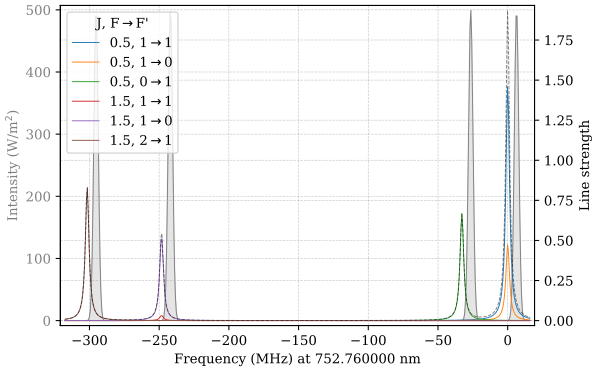
Transition spectrum#
    for la in system.lasers:
        la.I = la.I[0]
    system.plot_spectrum(
        wavelengths = [float(system.levels.wavelengths.iloc[0,0])*1e-9],
        relative_to_wavelengths = True,
        transitions_kwargs      = dict(
            kwargs_sum  = {'color': 'k', 'ls': '--', 'alpha':0.5},
            QuNrs       = [['J','F'], ['F']]
            ),
        )
Force plot#
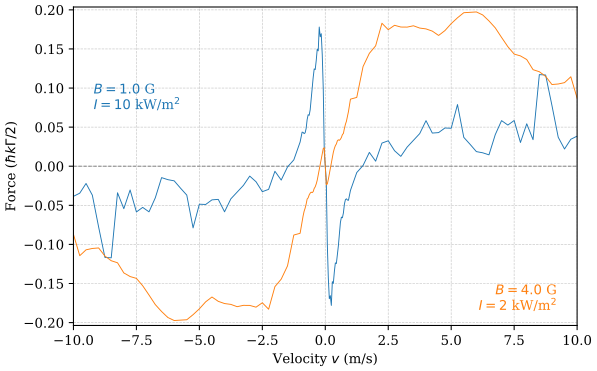
In the following the function get_results() is used to extract
the force and iteration values while flipping the force values from the
negative velocity range to the positive one.
The force array as a function on velocity and intensity (XY_keys) is
extracted as a slice of the data for a specific magnetic field iteration
with index XYY_inds.
    fig, ax = plt.subplots()
    ax.axhline(0, color='grey', ls='--')

    for i in range(2):

        Z, XY, XYY = tools.get_results(
            fname       = fname,
            Z_keys      = 'F',
            XY_keys     = ['v0','I'],
            XYY_inds    = [i], # index of residual iteration parameter magnetic field
            Z_data_fmt  = {'F': lambda x: x[2]},
            add_v0      = True,
            add_flip_v  = True,
            )

        velocity    = XY['v0']          # velocity array
        j           = 1-i               # intensity index
        intensity   = XY['I'][j]        # intensity value
        strength    = XYY['strength']   # magnetic field strength value

        # plot data
        color = f"C{i}"
        ax.plot(velocity, Z['F'][:,j] / system.hbarkG2,
                color=color)

        # add labels
        label = f"$B={strength*1e4:.1f}$ G\n$I={intensity*1e-3:.0f}$ kW/m$^2$"
        if i == 0:
            ax.text(0.04, 0.76, label, ha='left', va='top',
                    transform = ax.transAxes, color = color)
        else:
            ax.text(0.96, 0.04, label, ha='right', va='bottom',
                    transform = ax.transAxes, color = color)

    ax.set_xlim(-10,10)
    ax.set_xlabel('Velocity $v$ (m/s)')
    ax.set_ylabel(r'Force ($\hbar k\Gamma /2$)')
Simply plotting results#
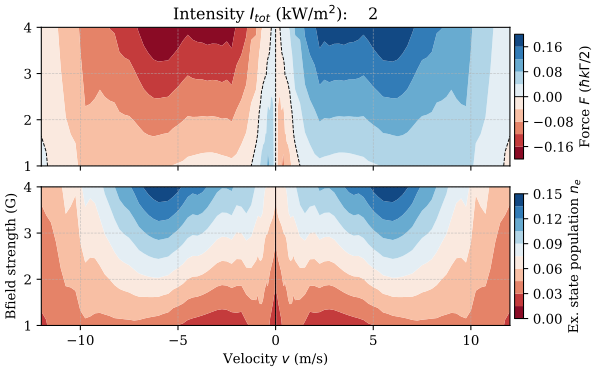
For this kind of complex data dependent on many parameters, the following function provides a convenient solution to easily visualize certain slices of this high dimensional data.
It is also practical to have a look on multiple physical quantities like
forces and excited state populations (Z_keys=['F','Ne']) and on
numerical aspects of the calculation like the execution time or number of
period steps until equilibrium is reached (Z_keys=['exectime','steps']).
In this demo data set here, there are 3 parameter dimensions, i.e. velocity, intensity and magnetic field, where the last two only possess two iterations. This is typically not enough to observe clear trends. However, it is a good example to demonstrate the functionality of the following function:
tools.plot_results(
    fname       = fname,
    Z_keys      = ['F','Ne'],       # also e.g. 'exectime'
    Z_data_fmt  = {'F': lambda x: x[2]},
    XYY_inds    = [0],              # indices of further parameter dimensions
    add_v0      = True,             # adds zero force for v=0
    add_flip_v  = True,             # adds e.g. positive velocities to negative
    add_I0      = True,
    Z_percent   = [],
    )